Up to now, every program I wrote for this series ran top to bottom, one line after another. Control flow is where that stops. A program starts choosing which lines run, and how many times.
I expected the syntax to be the hard part. It was not. if, elif, else, for and while are short words, and I had used all of them before. What actually took work was the boundaries: which branch gets checked and which never does, where a range really ends, and how much a single space or a missing parenthesis changes. This is what stuck, including the mistakes I made along the way.
The first true branch wins
An if / elif / else chain is checked from the top, one condition at a time. The first condition that is true runs its block, and everything below it is skipped. Not checked and rejected. Skipped.
battery_percent = 37

if battery_percent < 15:
    status = "critical"
elif battery_percent < 50:
    status = "low"
elif battery_percent < 90:
    status = "ok"
else:
    status = "full"
status ends up "low". The interesting part is what the second line does not need to say. By the time Python asks battery_percent < 50, it already knows the value is not under 15, so the branch really means "15 up to 50" without spelling it out. Every branch inherits everything ruled out above it.
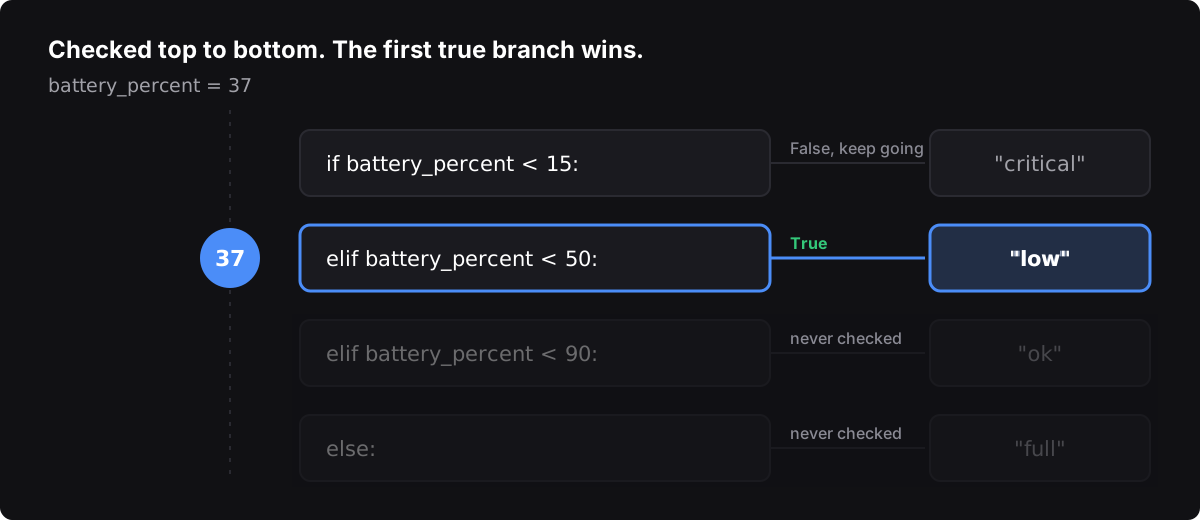
That also means order is part of the logic. If I had written battery_percent < 90 first, a value of 37 would land in "ok", and the "low" and "critical" branches could never run for anything under 90. Python would not complain. It would just quietly answer a different question than the one I meant.
When a branch needs to stand on its own, Python lets me write the range the way I would on paper:
if 15 <= battery_percent < 50:
    status = "low"
A chained comparison like that is easier for me to read than two conditions joined with and, and it makes both edges of the range visible at once. That matters, because the edges are where the bugs live.
A short choice can fit on one line
For a choice between exactly two values, Python has a conditional expression: the value if true, the condition, then the value if false.
label = "1 file" if file_count == 1 else f"{file_count} files"It earns its place in small spots like this one, where a full if / else block would be four lines just to pick a word. I learned to stop there, though. Nested conditional expressions are legal, and they read like a riddle. The moment I needed a second condition, the regular block was clearer.
Ask "is it in the list?" instead of chaining "or"
The bug I am most glad I learned early looks perfectly reasonable:
if extension == ".jpg" or ".png":
    print("image")
That prints image for every extension, including .txt. Python reads it as two separate tests: extension == ".jpg", or the string ".png" all by itself. A non-empty string counts as true, so the whole condition is always true.
The fix is the membership operator:
if extension in (".jpg", ".png", ".gif"):
    print("image")
It is shorter, it says what I mean, and adding a fourth extension is one more item instead of one more clause I could get wrong.
Indentation is the structure
In Python, indentation is not style. It decides which lines belong to which block, and which else belongs to which if.
if is_weekend:
    if is_raining:
        plan = "movie"
    else:
        plan = "hike"
else:
    plan = "errands"
Four spaces put a line inside the outer if. Eight put it inside the inner one. The two else lines look almost identical, and the only thing telling them apart is how far each one sits from the margin. Slide the inner else four spaces to the left and the program means something else entirely.
What tripped me up: I edited a nested block, my editor helpfully auto-indented a line I typed, and an elif ended up nested one level too deep. The error pointed at a line that looked fine. I now check indentation level by level — four, then eight — before I look for anything more complicated. I also stopped trusting the editor's guess on lines I paste into an existing block.
A long line can keep going inside brackets
Python ends a statement at the end of a line, unless the line is still inside an open (, [ or {. Then the statement keeps going on the next line. That is implicit line joining, and it is how long expressions stay readable:
summary = ("Checked " + str(checked) + " files, "
           + str(skipped) + " skipped.")
What tripped me up: this is exactly where small typos hide. When I forgot the closing parenthesis, Python reported an error on a later line, because as far as it knew, the statement had not ended yet. When I dropped a quote, the rest of the line became part of a string. In both cases the line Python complained about was not the line I had broken. Now, when an error points somewhere that looks correct, I look one or two lines up for an unclosed bracket or quote.
The other trap was spaces. Splitting a string across lines makes it easy to lose the space between two pieces, or to leave an extra one at the end. "files," followed by "3 skipped" prints files,3 skipped. A stray space after the final period is invisible on screen, but anything that compares output exactly sees a different string. Whitespace is data. I learned to print with repr() when output looks right but does not match, because it shows the spaces that the normal output hides.
range() stops before the stop
A for loop over range(start, stop, step) produces numbers from start up to, but not including, stop.
for page in range(1, 10):
    print(page, end=" ")
That prints 1 through 9. If I want 10, I have to say range(1, 11): the end I want, plus one. The step is the third number, so range(10, 31, 10) gives 10 20 30, and range(10, 30, 10) quietly stops at 20. A negative step counts down, and the stop is still excluded:
for seconds_left in range(5, 0, -1):
    print(seconds_left, end=" ")
print("go")
That prints 5 4 3 2 1 go. Zero is the stop, so it never appears.
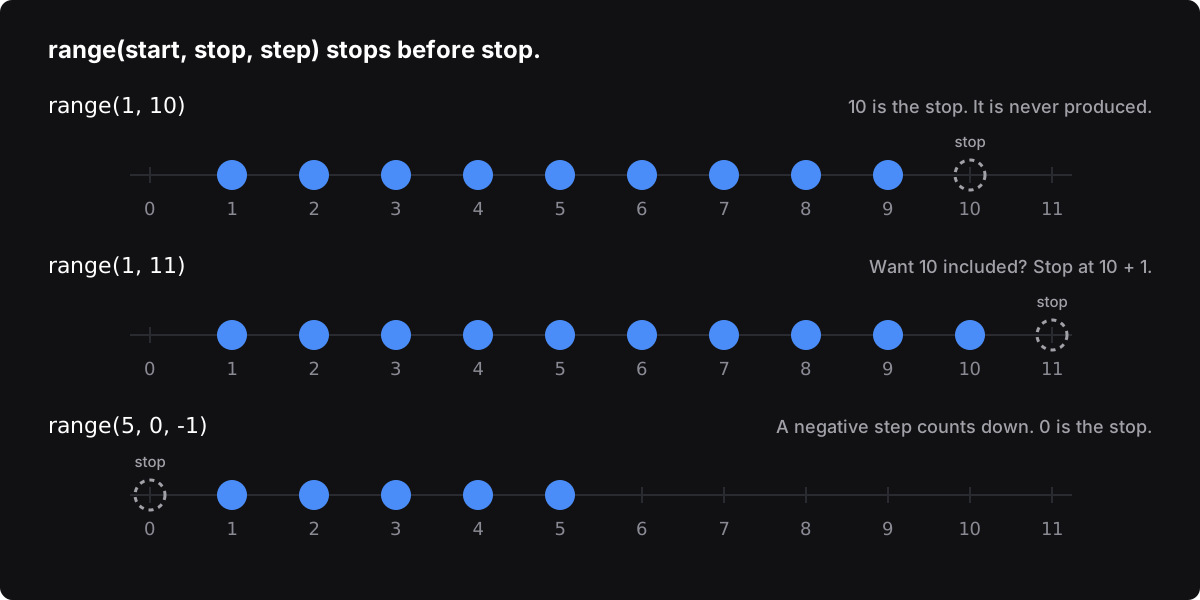
What tripped me up: the classic one. When a problem said "from this number to that number, both included," I wrote the second number as the stop and lost the last value. The output was one short and looked almost right. My fix is a habit, not a trick: when a range is inclusive, I write end + 1 on purpose and say so in a comment, and I test the first and last values before anything in the middle.
Two loop tools I did not know I needed
enumerate() hands a loop the position and the item together, which replaces the manual counter I used to keep beside every list:
for position, name in enumerate(waiting_list, start=1):
    print(position, name)
The other was a loop with an else block. The else runs only if the loop finished without hitting break. That turns out to be exactly the shape of "search everything, and say so if nothing matched":
for reading in temperatures:
    if reading > 75:
        print("Too hot:", reading)
        break
else:
    print("No reading over 75")
I used to do this with a flag variable set to False before the loop and checked after it. The else says the same thing with nothing extra to track. It does read strangely at first, so I add a short comment the first time I use it in any file.
% and // work as a pair
Modulo (%) gives the remainder of a division. Floor division (//) gives the whole-number part and throws the remainder away. Used together in a loop, they take a number apart one piece at a time.
Converting a number to binary is the clearest example I found. value % 2 is the lowest bit. value // 2 drops that bit and shifts everything down. Repeat until nothing is left:
value = 13
bits = ""
while value > 0:
    bits = str(value % 2) + bits
    value //= 2
print(bits)    # 1101
The bits come out lowest first, so each new bit goes on the front of the string. Python's own bin(13) returns '0b1101', which is a quick way to check the loop got it right.
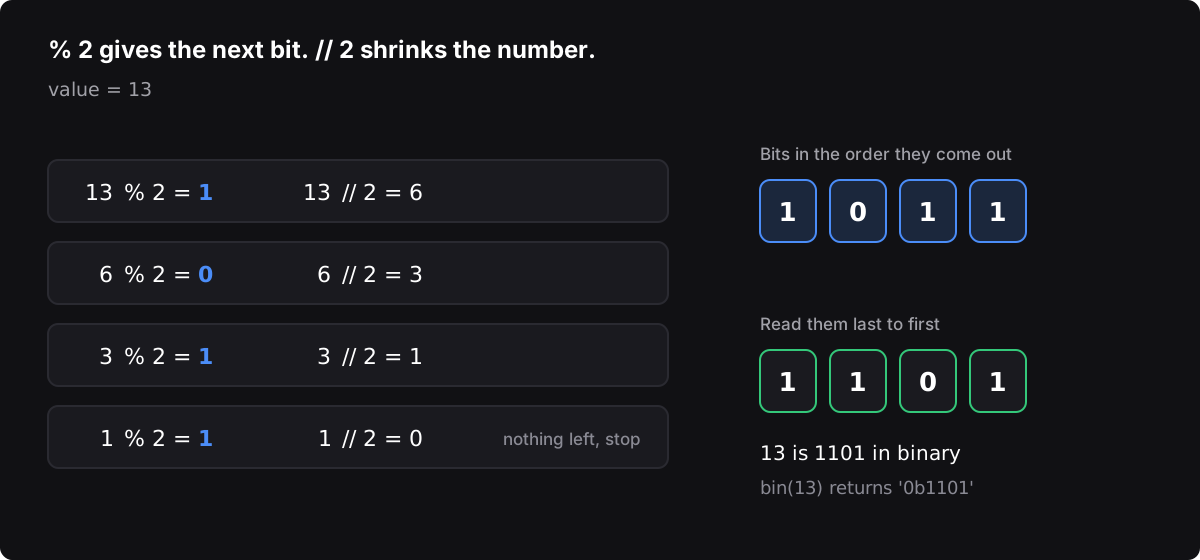
The same pair shows up everywhere once I started looking: % 2 tells even from odd, and // and % together turn a count of seconds into minutes and seconds.
Check for a built-in, and decide what "valid" means first
Two smaller lessons came from writing code that worked and was still more than it needed to be.
Look for a built-in before writing the logic. I wrote a comparison chain to find the smallest of a few values before remembering that min() and max() already exist, take any number of values or a whole list, and cannot get the comparisons backward.
Decide what counts as valid input before deciding anything else. The main logic of a decision is usually the easy part. The real work is the values that should not get that far: zero, negative numbers, a value at exactly the boundary, a number that is the right size but still not allowed. Writing that check first, at the top, kept the rest of the code simple. Examiners decide what is in scope before they start looking. Code benefits from the same order.
What tripped me up, and why
Most of my mistakes were not about concepts. They were about edges.
- A missing parenthesis or quote inside a joined line made Python report an error on a later line. The statement had not ended where I thought it had.
- A trailing space after the last word of the output made it look right and compare wrong. I could not see it until I printed it with
repr(). - Indentation one level off. Four spaces versus eight decided which
ifanelsebelonged to, and the editor's auto-indent made the choice for me without asking. - Off-by-one on inclusive ranges. I used the end value as the stop and lost the last number.
- Solving the problem I expected instead of the one in front of me. Two small problems looked nearly identical, and I reused my approach from the first without rereading the second. One condition was different, and my answer was confidently wrong. Similar is not the same.
None of those produced a dramatic failure. Each one produced output that was almost right, which is the more dangerous kind of wrong.
What I am applying
- Order conditions on purpose. Most specific or most urgent first, and I read the chain top to bottom asking what each branch has already ruled out.
- Write ranges the way I would on paper.
low <= value < high, with both edges visible. - Use `in` for "one of these." Never
x == a or b. - Check indentation by level. Four spaces, then eight, before looking for anything subtle.
- Look up, not down. When an error points at a line that looks fine, check the lines above it for an unclosed bracket or quote.
- Write `end + 1` deliberately for an inclusive range, and test the first and last values.
- Print with `repr()` when output looks right but does not match. Whitespace is data.
- Reread the problem every time, even when it looks like one I just solved.
What this insight does and does not support
- Observed. Learning Python's control flow —
if/elif/else, chained comparisons, conditional expressions, membership tests, indentation, implicit line joining,range(),enumerate(), loopelse, and modulo with floor division — the concepts themselves were manageable. The mistakes I actually made were at the edges: condition order, an unclosed bracket or quote, invisible whitespace, indentation level, and inclusive ranges. The examples here are my own and were run on Python 3. - Provides context. Useful for anyone learning to write decisions and loops, especially someone who learned to code by solving immediate problems. It suggests that the time to slow down is at boundaries, not at syntax.
- Not established by this piece alone. This is one learner's notes. It is not a claim about any tool or product, not a statement about how any organization writes or tests software, and not evidence that these habits alone make code correct.
Test your own decisions the same way: the first value, the last value, and the one right on the line. Believe what the program prints, not what you meant to write.
Views are the owner's own.