I did not learn to program in order. I learned the practical way: a concrete problem showed up, I learned just enough code to ship something that solved it, and I moved on. That approach built real things. It also kept running into the same wall — tools that worked on the day I wrote them and became fragile the moment the problem shifted, and code I could not fully explain if somebody asked me to defend it.
My day job is digital forensics. Nearly every step of that work runs through software somebody else wrote, from extraction to validation to case management. At some point I decided I did not want to stay only a consumer of those systems, and that if I was going to build tools of my own, I needed a foundation I could trust before writing anything bigger. So I went back to the first chapter of Python and started over.
This is what the first week looked like from the inside: what was already familiar, what was harder than I expected, and what I am already applying.
What I was already comfortable with
A lot of week one was confirmation rather than discovery, and that was useful in its own way.
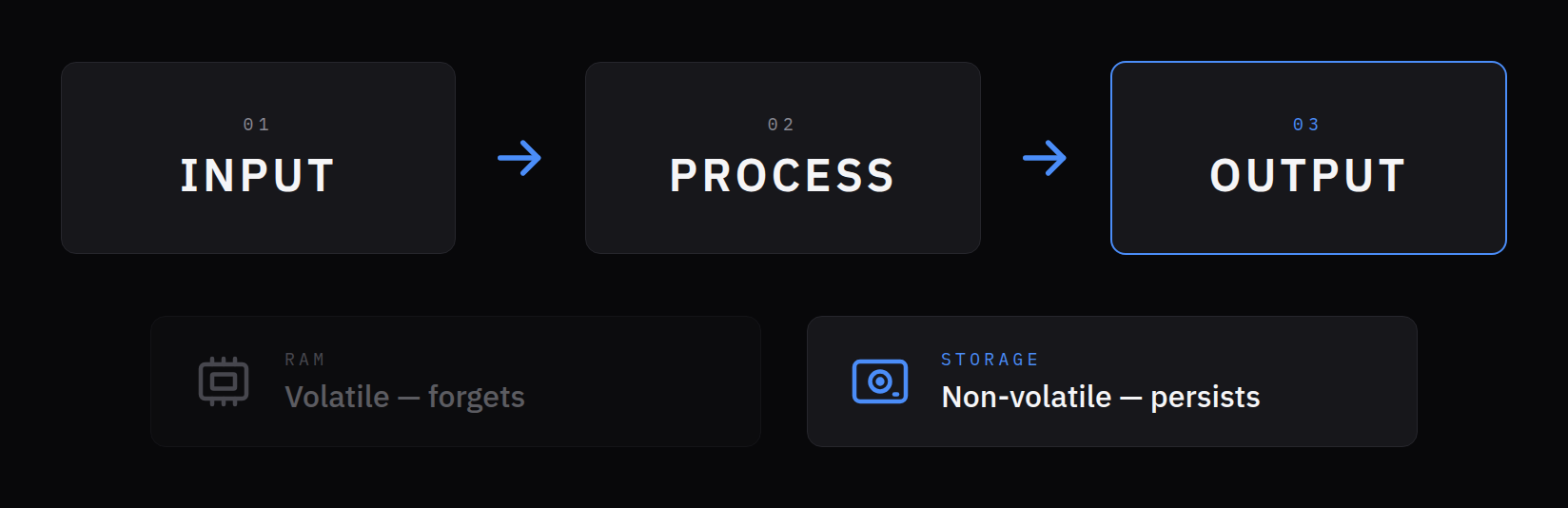
- A program is input, process, output. Read something in, do something to it, put the result somewhere. Every tool I have ever hacked together fits that shape, even when I never named it.
- Instructions run one at a time, top to bottom. That is the same lesson I wrote about in an earlier note on order and precision. Seeing it stated plainly on page one was a small vindication.
- Variables are names for values, and the value can change. Reassigning a name and rerunning a calculation is second nature after years of spreadsheets.
- Editors and terminals. I already live in a code editor and a command line, so running a file with an argument after the program name was not new.
- What happens under the hood. A processor pulling instructions and data out of memory, both stored as nothing but ones and zeros. RAM that forgets everything when the power goes out, and storage that does not. Flash that holds its bits after it is unplugged. This was the one stretch of the week where my day job was ahead of the material — the difference between volatile and non-volatile data is something forensic examiners think about constantly, long before they ever write a line of code.
None of that was hard. What surprised me was how much of the *rest* I had been using for years without actually understanding it.
Text that looks like a number is still text
The first thing that genuinely caught me: whatever a user types in comes back as text, even when it looks like a number.
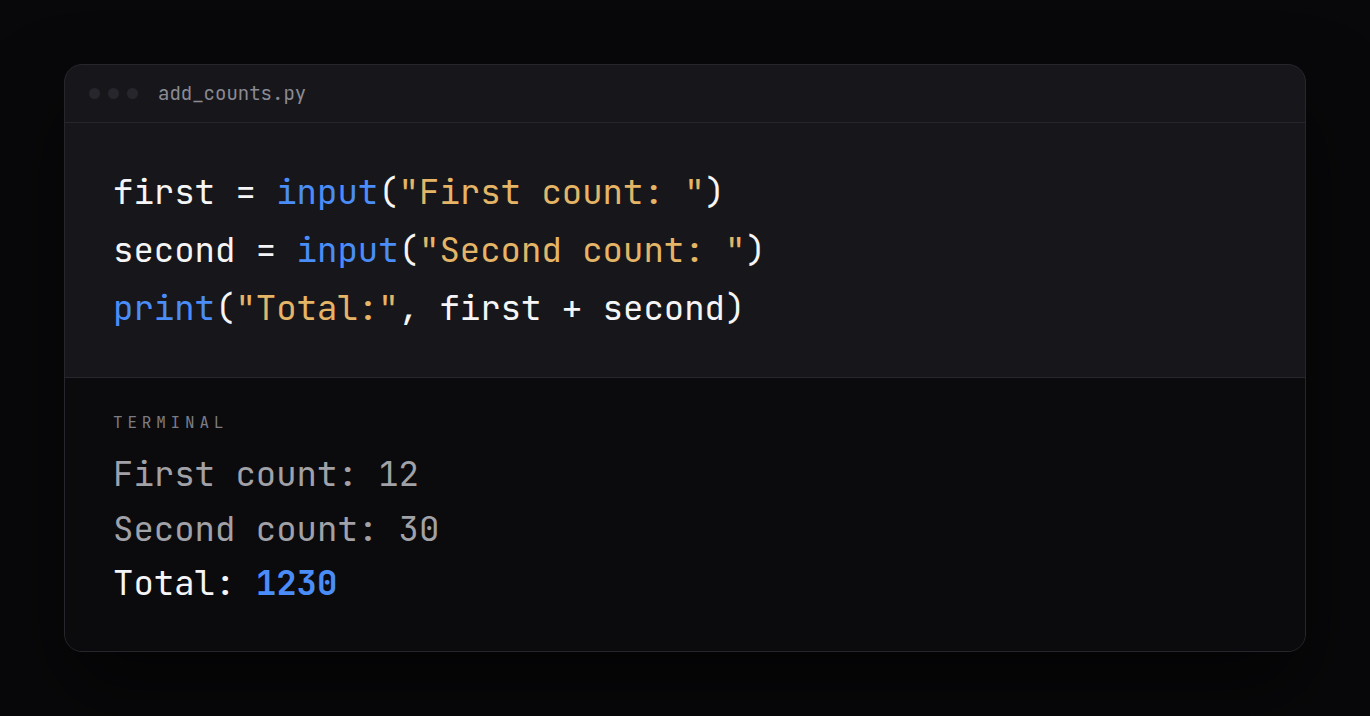
first = input("First count: ")
second = input("Second count: ")
print("Total:", first + second)
Type 12 and then 30, and the program cheerfully prints Total: 1230. No error. No warning. It glued two pieces of text together, because that is what + does to text.
first = int(input("First count: "))
second = int(input("Second count: "))
print("Total:", first + second)
Converting each value to an integer on the way in gives Total: 42, which is what I meant the first time.
I have almost certainly written the first version before and patched around the symptom without ever naming the cause. The lesson I am keeping is that a value's type is part of the value. The same characters can mean two different things, and the program only knows which one I intended if I tell it.
The equals sign is not equals
The second thing I had to unlearn was a symbol I have read one way my whole life. In Python, = does not mean "is equal to." It means attach this name to this value, right now.
That is why a line like this is perfectly normal code, even though as algebra it is nonsense:
total = total + 1It says: take the value total currently points at, add one, and point total at the result. Order is everything — the right side is worked out first, and only then does the name move.
The part that actually caught me was what the name *is*. I had pictured a variable as a box with a value inside. Python works differently: a value is an object somewhere in memory, and a name is a label tied to it. Assignment ties the label.
files_found = 10
first_count = files_found
print(files_found is first_count)
files_found = files_found + 5
print(files_found, first_count)
print(files_found is first_count)
That prints True, then 15 10, then False. After the second line there is one object, 10, with two labels on it — nothing was copied. The addition did not change that 10; it built a brand-new object, 15, and moved the files_found label onto it. first_count never moved, so it still points at the original 10.
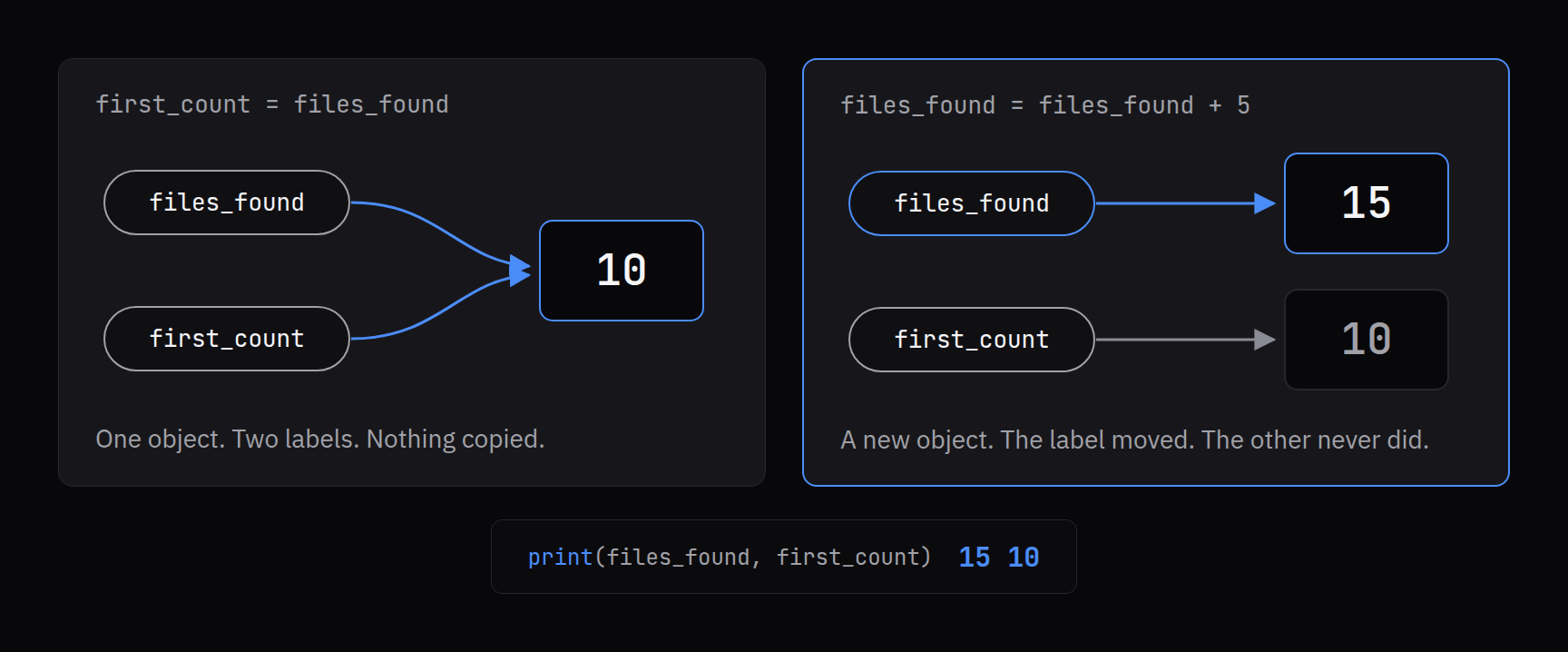
And when no label points at an object anymore, Python quietly throws it away to free the memory. The value is not overwritten in place; it becomes unreachable, and then it is gone.
That model lands differently for someone in forensics. A label pointing at data, the data itself, and what happens to data once nothing points at it anymore are questions I already ask about file systems. Seeing the same questions show up inside a four-line program made me much more careful about which labels I move.
Every object also carries three things: its value, its type, and its identity — which object it is. type() tells you the second. is asks about the third: not "do these hold the same value," but "are these the same object." Same contents and same item are different claims, in code and in evidence.
Three kinds of wrong
The other idea that landed hard was that errors come in different kinds, and they fail in very different ways.
- Syntax errors break the rules of the language — a missing quote, an unclosed parenthesis, two statements jammed onto one line. Python refuses to run the file at all, so nothing half-happens.
- Runtime errors are legal code attempting something impossible, like turning the word
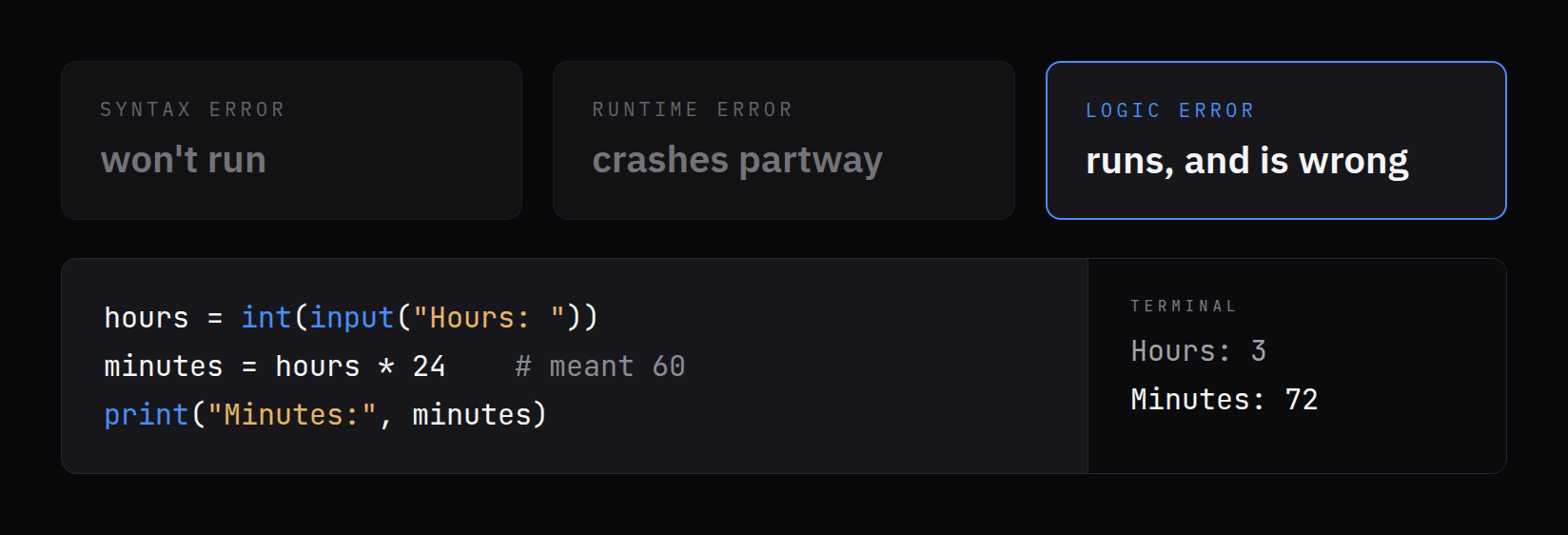
noneinto an integer. The program starts, gets partway, and stops with a message naming the line and the type of error. - Logic errors are the ones that frighten me. The code is valid, it runs to the end, and the answer is wrong.
Here is one I could easily have written:
hours = int(input("Hours: "))
minutes = hours * 24    # meant 60
print("Minutes:", minutes)
Enter 3 and it prints Minutes: 72. It looks like an answer. It has the right shape, the right label, and a plausible-sized number. Nothing on the screen suggests anything is wrong.
Part of the fix is naming. minutes = hours * 24 hides the mistake. Names that carry their units — duration_hours, duration_minutes, MINUTES_PER_HOUR = 60 — make a wrong conversion look wrong on the page before it ever runs. Python only requires that a name start with a letter or underscore, avoid spaces and symbols, and not be a reserved word like True or and. Everything else about a good name is on me, and it is cheaper than debugging.
In my field, that distinction between crashing and quietly being wrong matters more than anything else I covered. A crash is honest — it tells you it failed. A confident wrong answer that looks like every other right answer is the kind of mistake that survives review. That is exactly why I came back to fundamentals: the goal is not code that runs, it is code whose output I can stand behind.
What is shown is not what is stored
Numbers turned out to have more personality than I expected.
Python keeps whole numbers and decimal numbers apart. Whole numbers are for things you count — files, devices, minutes. Decimals, called floats, are for things you measure — sizes, rates, temperatures. Division always hands back a float, even when the answer comes out even. And floats are not always exact:
elapsed_hours = 7 / 3
print(elapsed_hours)
print(f"{elapsed_hours:.2f}")
print(elapsed_hours == 2.33)
That prints 2.3333333333333335, then 2.33, then False. Formatting to two decimal places changes what is displayed. It does not change what is stored. The rounded number on the screen is a presentation of the value, not the value.
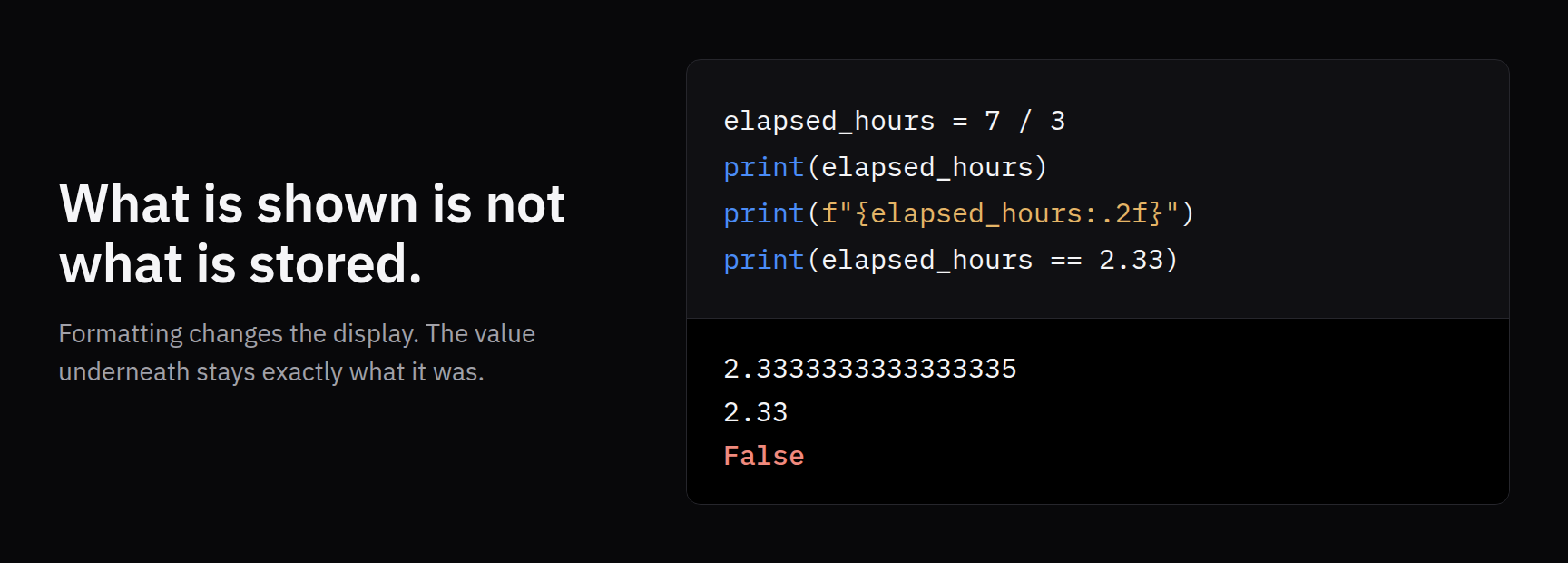
I already hold that distinction as an examiner: what a tool displays and what is actually in the data are two things, and you do not compare against the display. Seeing Python draw the same line in three lines of code was a useful reminder that my own scripts need the same discipline.
The division operators made a smaller point just as sharply. // divides and drops the remainder; % gives back only the remainder. Together they break a duration apart cleanly:
duration_seconds = 3725
print(duration_seconds // 60, duration_seconds % 60)
That prints 62 5 — sixty-two minutes, five seconds — where plain / would have printed 62.083333333333336 and left me to round my way into the wrong answer.
Where it got harder than I expected
Some of the difficulty was not conceptual at all. It was precision.
Exact output is unforgiving. Several exercises were checked character for character. An extra space, a missing blank line, or a period in the wrong place failed the check, even when the "idea" was right. It was irritating for about a day, then it became familiar — reports in my world get compared exactly too, and "basically the same" is not a standard anybody accepts there.
Small details carry the whole program. = and == are different operators. One wrong variable name in the right place is a bug that reads like working code. An average computed as a sum divided by a count will run flawlessly for months and then fail the first day the count is zero. None of these look like big mistakes, and every one of them changes the answer.
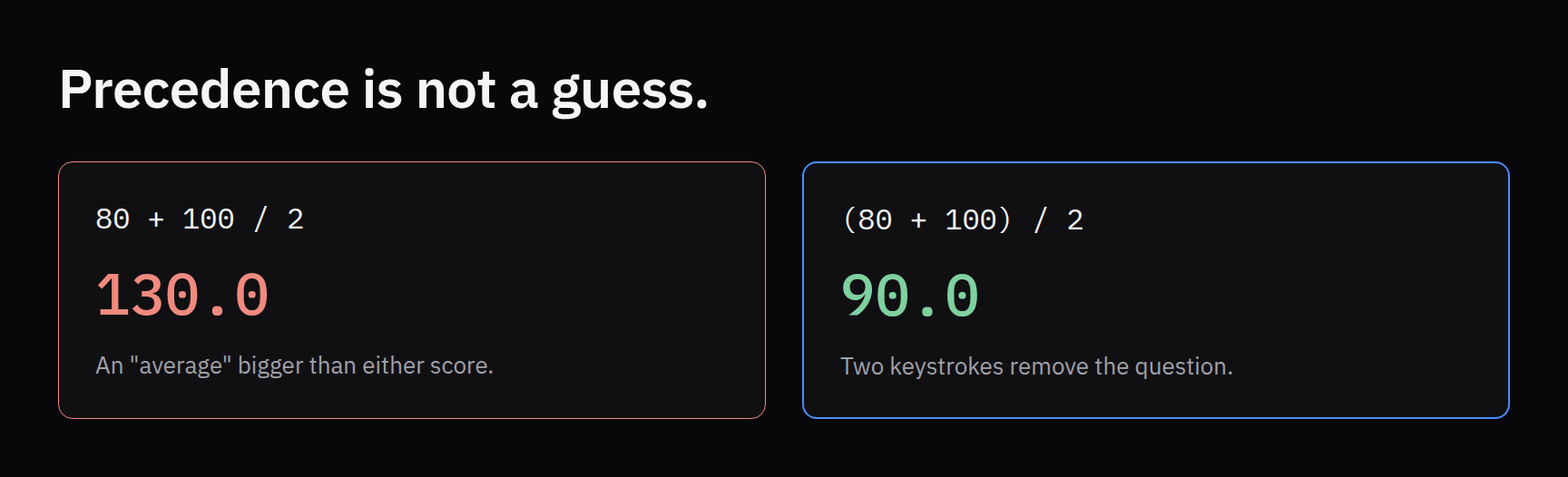
Precedence is not a guess. Python does multiplication and division before addition and subtraction, exactly as in math class — which means it does not do what I *meant* when I forget that.
first_score = 80
second_score = 100
print(first_score + second_score / 2)
print((first_score + second_score) / 2)
The first line prints 130.0, an "average" larger than either score. The second prints 90.0. Both run without complaint. Parentheses cost two keystrokes and remove the question entirely, so I now use them whenever the order is not obvious at a glance.
A comma in a number is not formatting. Writing file_count = 2,000 does not store two thousand. It silently stores a pair of numbers, (2, 0). No error, just a different kind of object than I asked for. Large numbers are written without commas, or with underscores, as in 2_000.
`print` makes quiet decisions for you. Separate several values with commas and it inserts a space between each one, then ends the line. Tell it end=" " and the next output stays on the same line. \n forces a new line and \t inserts a tab. None of that is hard, but I had been fighting spacing in my own scripts for years by trial and error instead of just knowing the rule.
Running early and often goes against my habit. The advice is to write a few lines, run them, fix what breaks, and only then write more. My habit has always been to write the whole thing and debug it as a block. After a week of doing it the slow way, the slow way is clearly faster: when something breaks, it broke in the last three lines.
What I am applying this week
The material was introductory. The habits it pointed at are what I am actually carrying into my own projects right now.
- Convert on the way in. Anything a program reads, I convert to the type I mean at the moment I read it, rather than trusting it to be a number later.
- Run every few lines. Small steps, run, check, continue. When something fails, the search space is three lines, not three hundred.
- Keep one known answer. Before trusting a calculation, I run it once on an input where I already know the correct output. If
3hours does not come back as180minutes, I have found a logic error before it found me. Testing against known data is already how forensic tools are supposed to be validated; applying the same discipline to my own small scripts is overdue. - Keep a label on anything I still need. If I will want the original value later, I leave a name pointing at it before moving any labels. Once nothing points at an object, it is gone.
- Put units in names and parentheses in formulas.
duration_seconds, notd.(a + b) / 2, nota + b / 2. Both make mistakes visible before they run. - Compare stored values, not displayed ones. Formatting is for the reader. Calculations and comparisons use the real value.
- Read the error type, not just the line number. A
ValueError, aTypeError, and aNameErrorpoint at different mistakes. The name of the error is the first clue, and I used to skip straight past it.
What this insight does and does not support
- Observed. Starting Python from the first chapter after years of learning ad hoc confirmed the basics I already had — sequence, input and output, editors and terminals, and how processors, memory and storage fit together — and exposed gaps I had been working around: input arriving as text, names as labels bound to objects rather than boxes holding values, the difference between syntax, runtime and logic errors, operator precedence, the gap between a displayed number and a stored one, and exact output formatting.
- Provides context. Useful for anyone who learned to code by solving immediate problems and is now deciding whether going back to fundamentals is worth the time. It suggests that the payoff is less about new material and more about naming things you were already doing by accident.
- Not established by this piece alone. This is one learner's first week. It is not a claim about any tool's reliability, not a statement about how any agency builds or validates software, and not evidence that these habits alone make code defensible.
Your own gaps will be different. Find them the same way I found mine: run the code on an input where you already know the right answer, and believe the output — not what you meant to write.